Hairstyle App in Your Browser — No Download Needed
Looking for a hairstyle app to test a new look? Try this one first — right here, no install. This free hairstyle app turns one uploaded photo into realistic previews of 44 hairstyles and 17 colors: bob, fade, braids, curls, and more. The hairstyle app keeps your face and lighting untouched and rebuilds only the hair, so every preview is genuinely you. No sign-up, no subscription wall — the hairstyle app works in your browser in about a minute, and your first previews are free. If you love it, the TressHue iOS app is one tap away; if not, you lost nothing but sixty seconds.

Example: Afro · Natural Black
Upload your photo to see it on yourself
Hairstyle App Results
Every preview below was made by this hairstyle app from a single uploaded photo — no install, no account, no watermarked tease. The hairstyle app changes only the hair while your face, lighting, and background stay exactly as they are, so what this hairstyle app shows is genuinely how the look would frame your features.


From Long Hair to a Blonde Bob
A chin-length wavy bob with curtain bangs, rendered by the hairstyle app in one pass — cut and color tested together. When the hairstyle app version of you feels right, the salon visit becomes a formality.
- Cut and color in one preview
- Natural hairline preserved


A Clean Taper Fade, Zero Clippers
The hairstyle app renders a low taper fade with real clipper blending and your natural hairline intact. Men's styles are first-class here — the hairstyle app is not just a women's tool with a beard filter bolted on.
- Realistic fade gradient
- Unlimited style comparisons
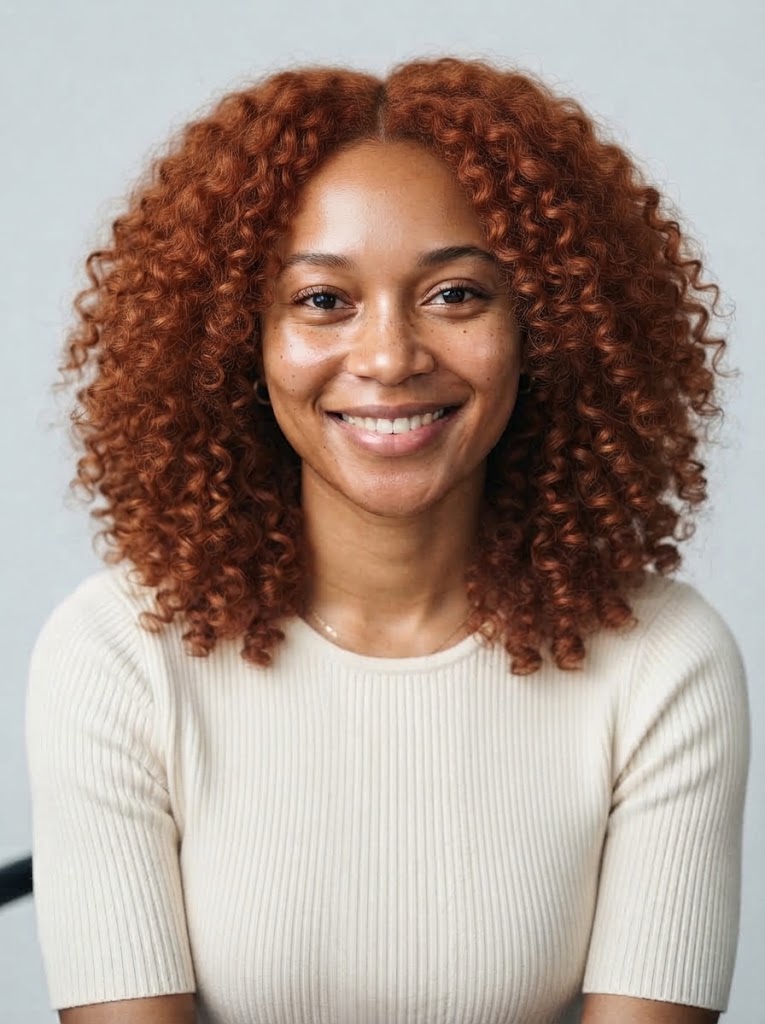

Copper Curls on Natural Texture
Straight to coily, this hairstyle app respects real texture instead of smoothing it away. Shoulder-length copper curls with authentic definition — and the hairstyle app can recolor or restyle the same photo as many times as you like.
- Authentic curl definition
- Same photo, unlimited restyles
Why This Hairstyle App Wins
People download a hairstyle app expecting magic and usually get a paywall, an account form, and a cartoonish sticker. This hairstyle app was built as the answer to those complaints: open the page, upload a photo, and judge the quality yourself before anything asks you for anything.
No Download, No Storage
Most hairstyle apps demand an install before you see a single result. This hairstyle app runs the full experience in your browser — zero megabytes, zero commitment.
No Sign-Up Wall
The top complaint about hairstyle apps is the account wall before the first preview. This hairstyle app skips it: upload, pick, generate — done.
44 Real Hairstyles
From buzz cut to braids, every style in this hairstyle app carries a tested visual recipe, so a fade actually fades instead of blurring into mush.
17 Colors Included
Most hairstyle apps treat color as an afterthought. Here every cut can be recolored — natural shades, bold neons, and ombre blends alike.
Compare Side by Side
One upload, unlimited tries. This hairstyle app keeps your photo in place while you cycle through looks, so comparing options takes seconds of thought, not days of doubt.
App When You Want It
Love the results? The TressHue iOS app takes this hairstyle app on the go. But the browser version is always here — no install required.
How the Hairstyle App Works
Upload Your Photo
Drop a clear, front-facing photo into the hairstyle app — a phone selfie in good light works perfectly.
Pick a Style and Color
Browse 44 hairstyles and 17 color shades. The hairstyle app shows a live preview image of each combination as you choose, so you know the vibe before you generate.
Generate and Download
The hairstyle app returns your result in about a minute. Download it, compare it, restyle it — or take it straight to your stylist.
Want This Hairstyle App in Your Pocket?
The browser version of this hairstyle app is always free to start. If you want your looks saved, your credits synced, and new styles the day they drop, grab the TressHue app for iOS — the same engine as this hairstyle app, built for your phone, with your whole style history one tap away. An Android version is in beta testing and lands soon.
Get the iOS AppHairstyle App FAQ
Is this hairstyle app really free?
Yes. This hairstyle app gives new users free credits — enough for your first previews with no cost and no account. Credit packs and subscriptions exist for heavy use, but the first try is always free, and the hairstyle app never locks the preview behind a payment first.
Do I need to download anything?
No. The hairstyle app runs entirely in your browser on phone or desktop — same engine, same 44 styles, same 17 colors. If you want a native experience with saved looks and synced credits, the TressHue iOS app is on the App Store — but it is optional, not required.
How is this different from App Store hairstyle apps?
Three ways: no install before you see results, no sign-up wall, and no forced subscription to unlock a single preview. Most store listings promise magic and deliver a paywall; this hairstyle app lets you judge the quality first, then decide.
How realistic are the previews?
The hairstyle app keeps your face, lighting, and background exactly as they are and rebuilds only the hair with real texture and your natural hairline. That is the difference between a believable preview and a sticker slapped on your forehead. Run the same photo through the hairstyle app twice with different styles and compare — realism shows in the side by side.
What photo works best?
A clear, front-facing photo in good light with your hairline visible. A phone selfie is perfect. Hats and heavy shadows make the hairstyle app less accurate.
Is there an Android version?
The browser version of this hairstyle app works on any Android phone today — Chrome, Samsung Internet, whatever you have. A native Android app is in beta testing right now; meanwhile you lose nothing by using the web version, since the hairstyle app engine and results are identical.
Can I download and share the results?
Yes. Every preview from the hairstyle app can be downloaded and shared — show your stylist, poll your friends, or post the before-and-after.
The Hairstyle App That Never Asks for Storage
One upload, about a minute, zero installs. See your next look before you commit to it — or to yet another app subscription.
Try the Hairstyle App Free