Butterfly Cut Filter: Fake Short Hair, Keep the Length
The butterfly cut is long hair's best magic trick: short, bouncy layers around the face stacked over longer lengths underneath, so the two tiers open like wings when you move. This free butterfly cut filter renders that 90s supermodel blowout on your own photo in about a minute. Upload a selfie and the butterfly cut filter builds the face-framing pieces, the airy volume, and your real hairline. Curly or straight, the butterfly cut filter keeps your texture honest. Try it in thirteen colors, download the preview, and let the butterfly cut filter show you the haircut everyone mistakes for short hair. No app, no sign-up — the butterfly cut filter runs in your browser.
Drag and drop your image here, or click to select
Supported formats: JPG, PNG, WEBP
Customize Your Hair Color
 butterfly cut
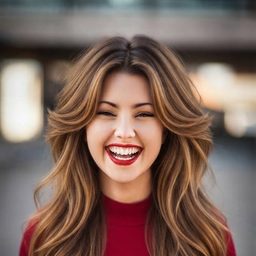
Example: Butterfly Cut · Natural Black
Upload your photo to see it on yourself
What Is a Butterfly Cut?
A butterfly cut is a heavily layered long haircut: the top layers are cut short around the face — often chin to cheekbone length — while the under layers stay long. Styled with a blowout, those short pieces sweep outward like wings, which gives the cut its name. The butterfly cut filter above shows that silhouette on your face before anyone picks up scissors.
The secret is the illusion: from the front, a butterfly cut reads as a bouncy shoulder-length style, because the short layers frame your face. From the back, you still have every inch of your length. It is the haircut for long-hair people who want a change but fear regret — that is exactly what the butterfly cut filter is for.
The look peaked with 90s supermodels — that big, blown-out, bouncy volume — and social media brought it roaring back. Styling takes a large round brush or a curling iron and about ten minutes, but air-dried it still falls softly. Run the butterfly cut filter in a few colors to see which mood fits you best.
One Butterfly Cut, Thirteen Colors
Winged layers catch light differently in every shade — caramel adds glow, copper adds drama, jet black adds polish. Every image below is the butterfly cut rendered by the butterfly cut filter in a different color; pick any swatch in the butterfly cut filter above and the same combination lands on your own photo. The butterfly cut filter never touches your face.













Why People Use a Butterfly Cut Filter
Long Hair, Zero Regret
You want short-hair energy without losing years of growth. The butterfly cut filter shows the fake-short illusion on your photo before you commit to any layers.
Before the Salon Conversation
Stylists hear "layers" and picture something different every time. Bring your butterfly cut filter result to the chair so the face-framing length is agreed on first.
90s Blowout Energy
Channel the supermodel era: big volume, sweeping face pieces, movement everywhere. Preview that energy with the butterfly cut filter before investing in a round brush.
Curly, Wavy, or Straight
Butterfly layers flatter every texture — curls get shape, straight hair gets movement. The butterfly cut filter renders your real texture, not a smoothed-out fantasy. Run the butterfly cut filter on your usual texture.
Rescue for Old Layers
If your last layers are stuck in an awkward stage, this might be the rescue cut. Check in the butterfly cut filter whether fresh face-framing pieces fix the shape.
Test Colors With the Layers
Layers catch light, so color matters more here. The butterfly cut filter recolors as convincingly as it cuts — try caramel, copper, or jet black with zero bleach.
How the Butterfly Cut Filter Works
Upload Your Photo
Drop a clear, front-facing photo into the butterfly cut filter — a phone selfie in good, even light is all the butterfly cut filter needs.
Pick a Color
The style is locked in for this page — the butterfly cut filter only asks you to tap one of thirteen swatches or dial in any custom shade.
Generate and Download
The butterfly cut filter returns your preview in about a minute. Download it for your stylist or send it to the group chat for a vote.
Will a Butterfly Cut Suit Your Face Shape?
Face-framing layers change proportions more than length does — the guide below narrows placement down, then the butterfly cut filter settles it on your face.
Oval
The ideal canvas — balanced proportions carry winged layers at any length, and the butterfly cut filter will confirm it in seconds.
Square
Soft, sweeping face pieces soften a strong jaw beautifully. Preview where they should start with the butterfly cut filter.
Round
Face-framing layers starting below the chin add the vertical lines a round face loves — the butterfly cut filter shows the difference.
Heart
Layers starting at the jaw balance a wider forehead and narrow chin — check the placement in the butterfly cut filter.
Diamond
Cheekbone-grazing wings highlight your best feature; the butterfly cut filter shows how soft or bold to go.
Oblong
Ask for shorter, fuller face layers that add width, not length — the butterfly cut filter makes that trade-off obvious on your photo.
Butterfly Cut vs Layers vs Wolf Cut
Classic long layers are subtle: they remove weight and add gentle movement, but the overall shape stays conservative. The butterfly cut is layers turned up — the top tier is deliberately short, so you get a dramatic face frame and that winged, blown-out shape. If your butterfly cut filter preview looks like too much drama, classic layers may be your real answer; if the butterfly cut filter preview looks perfect, you were ready.
The wolf cut is the butterfly cut's wilder cousin — choppier, shaggier, with a mullet-adjacent edge and heavy texture on top. The butterfly cut stays polished and bouncy; the wolf cut is messy on purpose. Run the butterfly cut filter first, save the result, then compare a wolf cut preview to see which attitude fits.
Still torn? Let your own photo vote. Generate a butterfly cut filter result, save it, then try the alternatives on the same selfie. Seeing all three shapes on your actual face beats any chart, and the butterfly cut filter makes the experiment free.
Butterfly Cut Filter FAQ
Is the butterfly cut filter free?
Yes. New users get free credits — enough for your first butterfly cut filter preview at no cost, and it runs right in your browser with no app install.
How realistic is the butterfly cut filter?
It keeps your face, lighting, and background untouched and rebuilds only the hair — short winged layers up top, long lengths beneath, your real hairline, no wig edges. Run the butterfly cut filter in two colors and compare side by side.
What photo works best?
The butterfly cut filter works best with a clear, front-facing photo in even light, hair worn down if possible. Phone selfies are fine; hats and heavy shadows make the butterfly cut filter less accurate.
Does the butterfly cut filter work on curly hair?
Yes — curls make the layers spring up into even more volume. The butterfly cut filter renders your actual curl pattern rather than smoothing it straight, so test it with your everyday texture.
Will a butterfly cut make me look like I have short hair?
From the front, often yes — that is the illusion people love, while your lengths stay intact underneath. Preview the effect with the butterfly cut filter before committing.
How much styling does a butterfly cut need?
The full 90s blowout takes a large round brush or a curling iron and about ten minutes; air-dried, the layers still fall softly. If that sounds steep, enjoy the look through the butterfly cut filter first.
Can I share my butterfly cut filter result?
Yes — download the preview, show your stylist the exact face-framing length, or post your before-and-after.






Ready? Try the Butterfly Cut Filter Now
One upload, about a minute, all your length still yours — the butterfly cut filter shows the wings before the first snip.
Try the Butterfly Cut Filter Free