Dreadlocks Filter: Preview Locs Before You Commit
Dreadlocks are one of the oldest hairstyles on Earth — and one of the biggest commitments you can make to your own hair. Locs take months to mature and years to grow long, which is exactly why this free dreadlocks filter exists. Upload a photo and the AI dreadlocks filter builds realistic, rope-like locs around your actual face, in your actual lighting. Test length, thickness, and thirteen colors with the dreadlocks filter, download the result, and walk into your first loc appointment already knowing the destination. The dreadlocks filter runs in your browser — no app, no sign-up, no years of waiting to find out.
Перетащите и оставьте ваше изображение здесь или нажмите, чтобы выбрать
Поддерживаемые форматы: JPG, PNG, WEBP
Настройте цвет волос
 dreadlocks
Пример: Дреды · Естественный черный
Загрузите свою фотографию, чтобы увидеть, как она будет смотреться на вас
What Are Dreadlocks?
Dreadlocks — locs, for short — are ropes of hair formed by matting, twisting, or coiling strands until they lock together permanently. They are ancient: locs appear in Egyptian art, in the jata of Indian ascetics, and across African cultures for thousands of years before Rastafari made them a global symbol of identity and resistance in the twentieth century. Few styles carry this much history, and few demand this much patience — the dreadlocks filter lets you borrow the look instantly while the real thing takes its time.
Not all locs are alike. Freeform locs grow with minimal manipulation and an organic shape. Sisterlocks are tiny, uniform, and grid-parted. Interlocked and palm-rolled locs sit somewhere between, and starter methods — two-strand twists, coils, braids — change how the mature loc looks. New locs also pass through months of fuzzy "baby" stages before they tighten. The dreadlocks filter shows you the finished silhouette on your face, so you can decide whether the destination is worth the journey.
Locs in Thirteen Colors
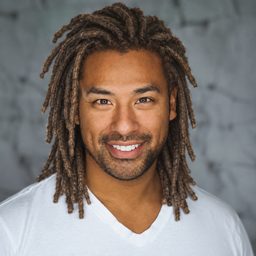
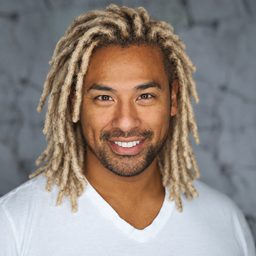
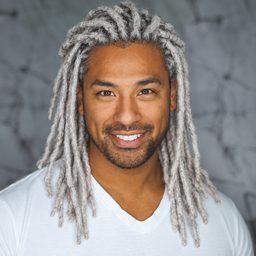
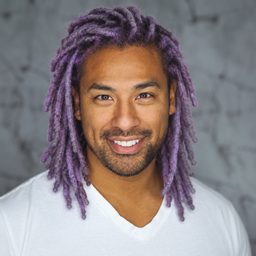
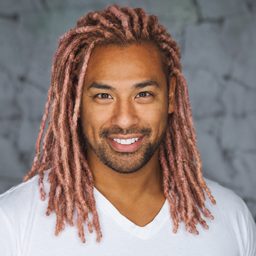
Color transforms locs — honey-brown tips read sun-kissed, deep black reads classic, burgundy reads bold. Each image below is the same style rendered by the dreadlocks filter in a different shade; pick any swatch in the dreadlocks filter above and the dreadlocks filter applies that exact combination to your own photo.









Why People Use a Dreadlocks Filter
The Multi-Year Decision
Starting locs is closer to getting a tattoo than getting a haircut — undoing it usually means cutting them off. A dreadlocks filter preview lets you live with the look on your own face before you commit months of maturing to it.
Choosing Your Loc Type
Thick freeform ropes or fine, uniform sisterlocks? The dreadlocks filter gives you the overall silhouette so you can tell your loctician which direction you are aiming for.
Surviving the Baby Stage
Starter locs look fuzzy and unfinished for months, and many people quit there. Keep your dreadlocks filter result on your phone as a picture of where those baby locs are heading.
Testing Length and Thickness
Shoulder-length or waist-length? Pencil-thin or chunky? Run the dreadlocks filter and study the proportions against your frame before your first retwist ever happens.
Color Without Damage
Dyeing mature locs means soaking them in chemical color. The dreadlocks filter tests blonde tips, auburn, or jet black on your locs with zero bleach and zero dryness.
Brief Your Loctician
Locticians work best from references. Bring your dreadlocks filter preview to the consultation so you both agree on parting, size, and length before the first section is twisted.
How the Dreadlocks Filter Works
Загрузите фото
Add a clear, front-facing photo to the dreadlocks filter — an evenly lit phone selfie with your hair pulled back works best.
Choose a Color
The dreadlocks filter locks the style for this page — tap one of thirteen swatches or dial in a custom shade for the locs.
Generate and Save
The dreadlocks filter returns your preview in about a minute. Download it for your loctician or share it with friends.
Will Dreadlocks Suit Your Face Shape?
Locs frame a face differently from loose hair — the guide below is a starting point, and the dreadlocks filter is the final word on yours.
Овальное
The easiest canvas — any loc size and length works. Let the dreadlocks filter confirm which length you like most.
Квадратное
Longer locs that fall past the jaw soften strong angles — check the drop in the dreadlocks filter before you pick a target length.
Круглое
Height at the crown and locs swept back add length to the face; the dreadlocks filter shows whether the vertical silhouette flatters you.
Сердцевидное
Medium locs with volume near the jaw balance a wider forehead — preview the fullness with the dreadlocks filter.
Ромбовидное
A fuller crown softens prominent cheekbones; test thicker locs in the dreadlocks filter to see the effect.
Вытянутое
Shoulder-length locs with side volume widen a long face — the dreadlocks filter makes the proportion easy to judge on your photo.
Loc Vocabulary for Your First Appointment
Walk in with your dreadlocks filter result and the right words. Starter methods: comb coils (small, neat beginnings for short hair), two-strand twists (chunkier start, fuller mature locs), and braidlocs (low frizz early on). Maintenance: a retwist re-tightens new growth at the roots, usually every four to eight weeks; interlocking pulls the loc through its own root and lasts longer between sessions. Maturity stages run from starter to budding to teen to mature — a year or more in total.
Size language matters too: sisterlocks are the finest, microlocs slightly thicker, and traditional locs pencil-width and up. The dreadlocks filter renders the overall silhouette rather than a specific grid, so pair your dreadlocks filter preview with a sentence like "medium locs, freeform-friendly" and your loctician will know exactly what you mean.
Dreadlocks Filter FAQ
Is the dreadlocks filter free?
Yes. New users get free credits — enough for your first dreadlocks filter preview at no cost. The dreadlocks filter runs in your browser with no app install, and credit packs or subscriptions are there if you want more colors and styles later.
How realistic is the dreadlocks filter?
The dreadlocks filter keeps your face, lighting, and background untouched and rebuilds only the hair — individual locs with real shadow and texture, not a painted-on wig. Run the dreadlocks filter twice in different colors and compare the results side by side.
Какое фото подходит лучше?
A clear, front-facing photo in even light, with your current hair pulled back or away from your face, gives the dreadlocks filter the cleanest canvas. Heavy shadows and hats make the dreadlocks filter less accurate.
Can the dreadlocks filter show sisterlocks versus freeform locs?
The dreadlocks filter renders a natural, medium-size loc silhouette that reads well for most loc types — use it to judge the overall shape and length, then discuss exact sizing with your loctician using the preview as your reference.
How much maintenance do real dreadlocks need?
Plan on a retwist every four to eight weeks while locs mature, plus regular washing with residue-free products — clean hair locs faster. The dreadlocks filter helps you decide whether that rhythm is worth it by showing the payoff first.
Does the dreadlocks filter work for straight hair or for men?
Yes. The dreadlocks filter works for any gender and any texture — real locs are started on straight and wavy hair every day, they just take longer to knot. Preview yours in the dreadlocks filter regardless of your starting texture.
Can I download and share the dreadlocks filter result?
Yes. Download the dreadlocks filter preview for your loctician consultation, send it to friends for a vote, or post your own future-look reveal.






See Your Locs Before the First Twist
Years of patience start with one decision. The dreadlocks filter shows you where the journey ends — in about a minute.
Try the Dreadlocks Filter Free