寸頭模擬:剪寸頭之前,先看你的樣子
想把頭髮一口氣推短嗎?這個免費的寸頭模擬工具,讓你在任何人拿起電剪之前,就先看到自己剪寸頭的確切模樣。上傳照片,AI 寸頭濾鏡會呈現逼真的極短髮流、你原本的髮際線和你照片裡的光線。寸頭可以搭配任何髮色,預覽圖直接下載——人生中最大膽的剪髮決定,就讓寸頭模擬幫你去除不確定性。免註冊、免裝 App,寸頭模擬在瀏覽器裡就能跑。平頭、寸頭、五分頭——不管你想叫它什麼,先預覽再決定。
將您的圖像拖放到此處,或按一下以選擇
支援的格式: JPG、PNG、WEBP
客製您的髮色
 buzz cut
範例:Buzz Cut · 自然黑色
上傳您的照片,將其套用在您身上看看
What Is a Buzz Cut?
A buzz cut is a short, even haircut done entirely with clippers — the same guard length over the whole head, or a slightly longer top with faded sides. It started as military standard issue and became a mainstream style because it is honest: no product, no blow-dryer, no hiding a receding hairline. What you see is the shape of your head and the line of your jaw.
That honesty is exactly why the decision feels big — and why a buzz cut filter earns its keep. The cut takes months to grow back, so seeing a realistic buzz cut filter preview on your own face first turns a leap of faith into an informed choice. That is exactly what the buzz cut filter is built for.
One Buzz Cut, Every Color
The same buzz cut reads completely differently in platinum than in jet black. Every image below comes straight from the buzz cut filter, rendered in a different shade — pick a color in the buzz cut filter above and you get the same combination on your own photo.


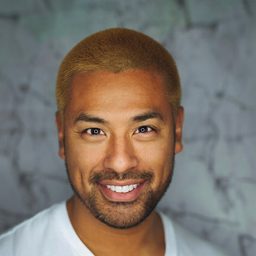

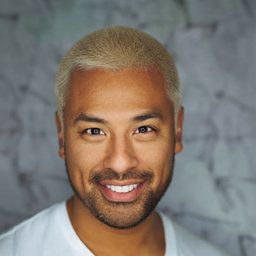


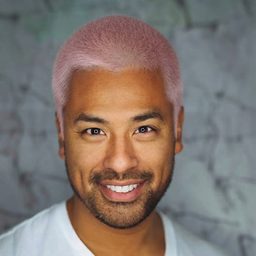
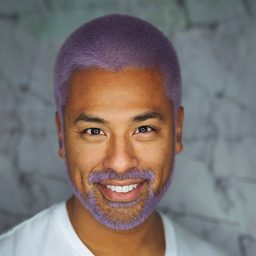




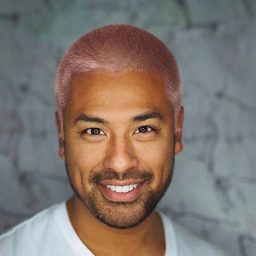
寸頭模擬實測結果
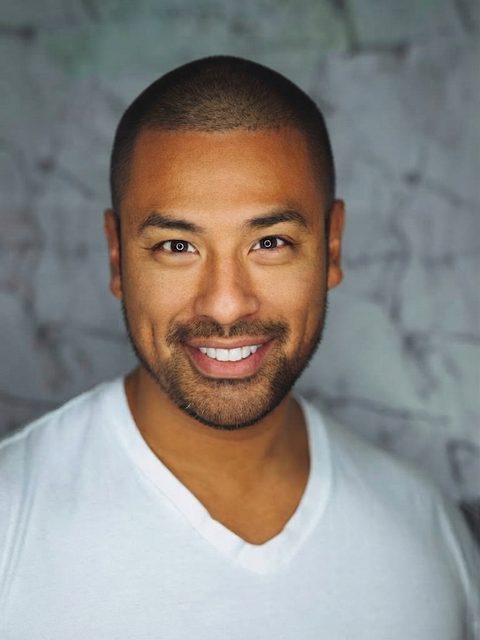
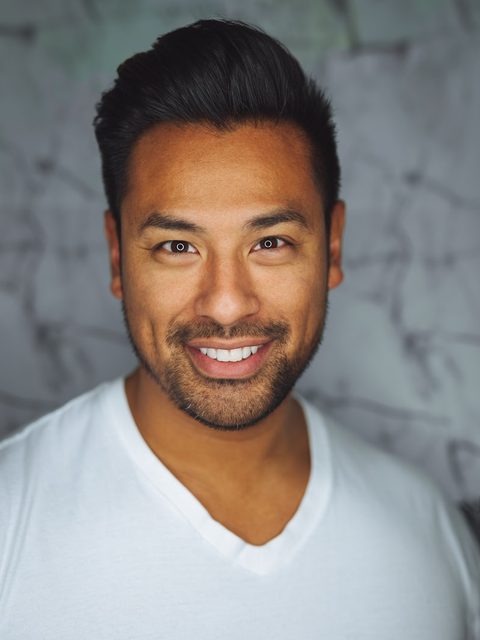
下面每張寸頭預覽,都是這個寸頭模擬從一張上傳照片生成的——沒有攝影棚、沒有造型、沒有修圖。寸頭以真實髮流和自然髮際線加上去,你的臉、光線和背景完全不動。所以寸頭模擬呈現的,就是寸頭真正襯托你五官的樣子。拖曳滑桿,對比剪之前和寸頭之後的差別。
從每天造型到零整理
再整齊的短髮,每天早上還是得抹髮品、照鏡子。這張寸頭預覽告訴你寸頭如何跳過這一切——五官更開、下顎線更俐落,原本的髮際線和鬍線完整保留。如果寸頭模擬裡的你零整理就這麼有型,想想每天早上能省下多少時間。
- 保留原生髮際線,沒有安全帽感
- 逼真電剪髮流與頭皮光影


細軟稀疏髮的重新開始
頭髮細軟或開始稀疏時,寸頭往往比留長看起來更豐盈。寸頭模擬讓你在剪之前誠實評估——而且大多數人發現,寸頭造型的自己看起來更年輕、更有自信。這是回答「鏡子答不了的問題」風險最低的方式。
- 第一刀之前先看髮量與頭型
- 換髮色重新生成,比較不同氣質


捲髮與爆炸頭髮質也適用
捲髮剪寸頭有自己的味道——服貼、均勻、有態度。寸頭模擬懂捲度,會真實呈現髮質,而不是把捲抹平。拿起電剪之前,先用寸頭模擬從各個角度確認頭型。
- 忠實呈現 3A–4C 髮質紋理
- 決定剪之前,先用任何髮色預覽
為什麼大家用寸頭模擬
剪寸頭前先決定
寸頭剪下去,要留好幾個月才長得回來。先用照片預覽寸頭造型,走進理髮店之前就知道答案。
髮量變少?寸頭重置
頭髮變細、髮際線後退時,寸頭往往比留長看起來更豐盈。寸頭模擬讓你在剪之前誠實評估這個取捨。
跟上寸頭潮流
#BuzzCutFilter 的寸頭造型正在洗版 TikTok 和 Instagram。用逼真不廉價的寸頭濾鏡,做出你自己的前後對比——特殊色寸頭、刻線寸頭這些玩法,都先試水溫再說。
拿寸頭預覽給設計師看
帶著寸頭預覽去理髮店,最容易和設計師喬好寸頭長度、髮際線形狀和整體感——第一刀下去前就講好。
寸頭也能試髮色
Platinum, copper, jet black, natural — this buzz cut filter recolors as well as it cuts, so you can test a bold shade in the buzz cut filter with zero bleach.
女生也能預覽寸頭
想剪極短髮?寸頭預覽讓你在動剪刀之前,先看寸頭怎麼襯托你的臉。
寸頭模擬怎麼用
上傳你的照片
把一張光線好的正面清楚照片丟進寸頭模擬——手機自拍就很好用。
選一個髮色
The buzz cut is locked in for this page — just tap a color swatch in the buzz cut filter or dial in any custom shade.
生成並下載
寸頭模擬約一分鐘回傳預覽圖。下載下來給設計師看,或分享給朋友。
你的臉型適合剪寸頭嗎?
寸頭會完整露出頭型和臉型,所以臉型格外關鍵。設計師對下面的基本原則都有共識——但每張臉都是獨特的。先用指南縮小範圍,再讓寸頭模擬在你自己的臉上定案。
鵝蛋臉
幾乎每種寸頭都適合——比例均衡,各種寸頭長度都撐得起來。
方臉(國字臉)
經典組合。寸頭會凸顯俐落的下顎線。
圓臉
兩側推高漸層、頭頂留一點長度,圓臉剪寸頭更立體。
菱形臉
漸層寸頭能襯托顴骨,讓臉部比例更勻稱。
心形臉
兩側剃短的寸頭可以平衡較寬的額頭和較窄的下巴。
長臉
選稍長的電剪套(#3–#4),寸頭留點長度,臉型不會顯得更長。
寸頭長度怎麼說:電剪編號一次看懂
帶著寸頭預覽去理髮店時,你會用到電剪套的編號。#1 大約留 3mm,是最短的經典設定;#2 約 6mm;#3、#4 約 10–13mm,頭頂會多一點髮流。台灣理髮店常說的「三分頭」「五分頭」也是這類極短長度。兩側再推高漸層,同一款寸頭立刻更俐落、更現代。寸頭和平頭其實是同一類髮型,台灣以前多叫平頭,現在的寸頭更講究漸層和輪廓線。寸頭模擬讓你看到整體感覺;這些數字,是你在椅子上開口的語言。
不確定哪種長度適合你?用寸頭模擬生成預覽、存下照片,讓設計師照著剪。
寸頭模擬常見問題
寸頭模擬要錢嗎?
Yes. New users get free credits — enough for your first buzz cut filter preview at no cost, with no app install. The buzz cut filter keeps credit packs and subscriptions optional if you want more colors and styles later.
寸頭預覽有多真?
The buzz cut filter keeps your face, lighting, and background exactly as they are, and rebuilds only the hair with clipper-short texture and your natural hairline — no helmet look, no hard cutout edges. That realism is what the buzz cut filter is tuned for.
什麼照片最適合做寸頭預覽?
A clear, front-facing photo in good light gives the buzz cut filter the most to work with — keep your hairline visible. A phone selfie works fine. Heavy shadows, hats, or hair covering the forehead make the buzz cut filter less accurate.
我的臉型適合剪寸頭嗎?
鵝蛋臉和方臉幾乎百搭各種寸頭;圓臉通常配漸層最好看。但每張臉都不一樣——最可靠的方法是直接看,這正是寸頭模擬存在的意義。
可以選寸頭長度或髮色嗎?
On this page the cut is locked to a classic buzz cut. Color is fully open: pick any swatch or custom shade, and the buzz cut filter renders the same cut in that color. Every buzz cut filter preview keeps the cut constant so color comparisons stay honest.
女生或自然捲也能用寸頭模擬嗎?
Yes. The buzz cut filter handles straight, wavy, and coily (3A–4C) textures, and works for any gender — the buzz cut filter renders authentic texture instead of smoothing curls away.
寸頭預覽可以下載分享嗎?
Yes. Download the buzz cut filter preview to show your barber, send it to friends for a vote, or post your own buzz cut filter before-and-after.


準備好了?讓你的照片跑一遍寸頭模擬
One upload, about a minute, zero regret. The buzz cut filter shows you the after photo before the first snip, and every buzz cut filter result is yours to download.
免費試試寸頭模擬