Wolf Cut Filter: See Yourself With a Wolf Cut First
Half 1970s shag, half mullet, fully TikTok-famous — heavy choppy layers, a wispy fringe, and wild volume up top. This free wolf cut filter puts that shaggy silhouette on your own photo in about a minute. Upload a selfie and the AI wolf cut filter rebuilds your hair with tousled layers, textured bangs, and that lived-in crown — straight, wavy, or curly, it only gets better messy. Run the wolf cut filter in thirteen colors, download the preview, and let the wolf cut filter answer what no mirror can.
將您的圖像拖放到此處,或按一下以選擇
支援的格式: JPG、PNG、WEBP
客製您的髮色
 wolf cut
範例:Wolf Cut · 自然黑色
上傳您的照片,將其套用在您身上看看
What Is a Wolf Cut?
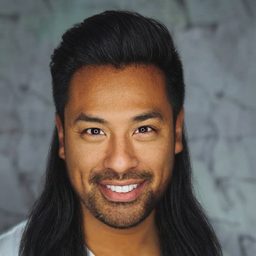
A wolf cut is a layered haircut that crosses a 1970s shag with a mullet: choppy, heavy layers on top, a wispy fringe, and longer, thinner lengths through the back. It exploded on TikTok in 2021 and never left. The wolf cut filter above shows that untamed shape on your own face before you hand a stylist the reference photos.
Unlike its parents, the wolf cut is gloriously low-maintenance. The entire point is texture and movement, so it air-dries into shape and a spritz of texturizing spray is usually the whole morning routine — the messier, the better. That forgiving nature is why this wolf cut filter makes sense: the cut flatters almost everyone, but the wolf cut filter shows how it flatters you.
It is also genuinely universal. The wolf cut works on straight, wavy, and curly hair — curls just make it more dramatic — and it reads equally well on any gender. Length is flexible too, from a jaw-length baby wolf to past the shoulders. Run the wolf cut filter and see which version your face was waiting for.
One Wolf Cut, Thirteen Colors
A wolf cut shifts personality with shade — jet black feels K-pop idol, copper feels seventies rock. Every image below is the wolf cut rendered by the wolf cut filter in a different color; pick any swatch in the wolf cut filter above and the same look lands on your photo.














Why People Use a Wolf Cut Filter
Before the Big Chop
Going from long hair to heavy layers is a leap. Run the wolf cut filter on your photo and confirm the destination is worth losing the length.
Straight, Wavy, or Curly?
The wolf cut behaves differently on every texture — curls amplify volume, straight hair shows off the choppy layers. This wolf cut filter previews the shape on your hair type.
Festival and Concert Season
Few cuts photograph as cool as tousled layers and wispy bangs. Preview the vibe with the wolf cut filter before festival season, then walk in looking like the headliner.
The Low-Maintenance Test Drive
If your styling ambition peaks at texturizing spray, this is your cut. Use the wolf cut filter to confirm you love the deliberately undone look before committing daily.
Show Your Stylist the Layers
"Shaggy but not a mullet" means something different to every stylist. Bring your wolf cut filter result to the chair and agree on fringe and layer weight before the first snip.
Test Wolf Cut Colors
Brunette, copper, silver — this wolf cut filter recolors as convincingly as it layers. Try a bold shade with zero bleach and zero regret.
How the Wolf Cut Filter Works
上傳你的照片
Drop a clear, front-facing photo into the wolf cut filter — a phone selfie in good, even light is all the wolf cut filter needs.
Pick a Color in the Wolf Cut Filter
The style is locked in for this page — the wolf cut filter just asks you to tap a swatch or dial in a custom shade.
生成並下載
The wolf cut filter returns your preview in about a minute. Download it for your stylist or a friends' vote.
Will a Wolf Cut Suit Your Face Shape?
Crown volume and a wispy fringe change proportions more than most cuts — the guide below narrows it down, then the wolf cut filter settles it.
鵝蛋臉
The ideal canvas — balanced proportions carry crown volume and fringe easily; the wolf cut filter confirms it in seconds.
方臉(國字臉)
Wispy bangs and choppy layers blur a strong jaw beautifully — check it in the wolf cut filter.
圓臉
Good news: crown volume adds length while layers slim the sides — the wolf cut filter shows how much lift flatters you.
心形臉
The fringe softens a wide forehead; fullness at the jaw balances a narrow chin — preview it in the wolf cut filter.
菱形臉
Textured layers at the crown and ends soften prominent cheekbones — test the balance with the wolf cut filter.
長臉
Keep the crown moderate and let the fringe shorten the face — the wolf cut filter makes that trade-off obvious.
Wolf Cut vs Mullet vs Shag
Bring your wolf cut filter preview to the salon and vocabulary matters. The shag is the seventies parent: feathered layers all over, curtain bangs, volume evenly distributed. The mullet is the eighties rebel: short up front and on top, length reserved for the back — business to party, hard contrast. The wolf cut is their child: it keeps the mullet's heavy crown and long back but blends them with shag-like choppy layers all over, so the transition is soft instead of a step.
Choose the shag for retro softness, the mullet for a deliberate statement, and the wolf cut for wild texture that styles itself. It is also the most forgiving to grow out — the layers simply relax into a shag. Run the wolf cut filter alongside a mullet photo and the blending difference is obvious — then run this wolf cut filter again in another color.
Wolf Cut Filter FAQ
Is the wolf cut filter free?
Yes. New users get free credits — enough for your first wolf cut filter preview at no cost, and the wolf cut filter runs right in your browser with no app install. Credit packs and subscriptions exist if you want more later.
How realistic is the wolf cut filter?
The wolf cut filter keeps your face, lighting, and background untouched and rebuilds only the hair — choppy crown layers, wispy fringe, and longer textured ends with your natural hairline, no wig-like edges. Run the wolf cut filter twice in different colors to compare.
什麼照片最適合做寸頭預覽?
The wolf cut filter works best with a clear, front-facing photo in even light with the hairline visible — a phone selfie is fine. Hats, shadows, or hidden hairlines make the wolf cut filter less accurate.
Is a wolf cut just a mullet?
No — it borrows the mullet's long back and heavy crown but blends them with shag-style layers everywhere, so there is no harsh step. The wolf cut filter shows the blended silhouette; a true mullet keeps the contrast on purpose.
How much upkeep does a wolf cut need?
Less than it looks: it air-dries into shape, and most mornings texturizing spray and a scrunch is the whole routine. Trim every six to eight weeks so the layers don't go stringy. If that sounds steep, the wolf cut filter lets you enjoy the look on your photo.
Does the wolf cut filter work for curly hair or men?
Yes. The wolf cut filter handles straight, wavy, and coily textures — curls render as extra volume — and the cut is genuinely unisex; K-pop idols and rock drummers wear the same style. Test yours in the wolf cut filter.
寸頭預覽可以下載分享嗎?
Yes. Download the wolf cut filter preview to show your stylist, send it to friends for a vote, or post your own before-and-after.





Ready? Run Your Photo Through the Wolf Cut Filter
One upload, about a minute, zero regret — the wolf cut filter shows you the after photo before the first snip.
Try the Wolf Cut Filter Free